
Retrieve the correct data file.
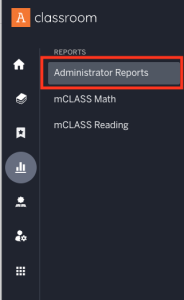
Go to your my.amplify.com site and click Administrator Reports.
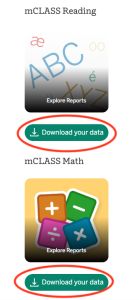
Choose Reading or Math and Download your data.
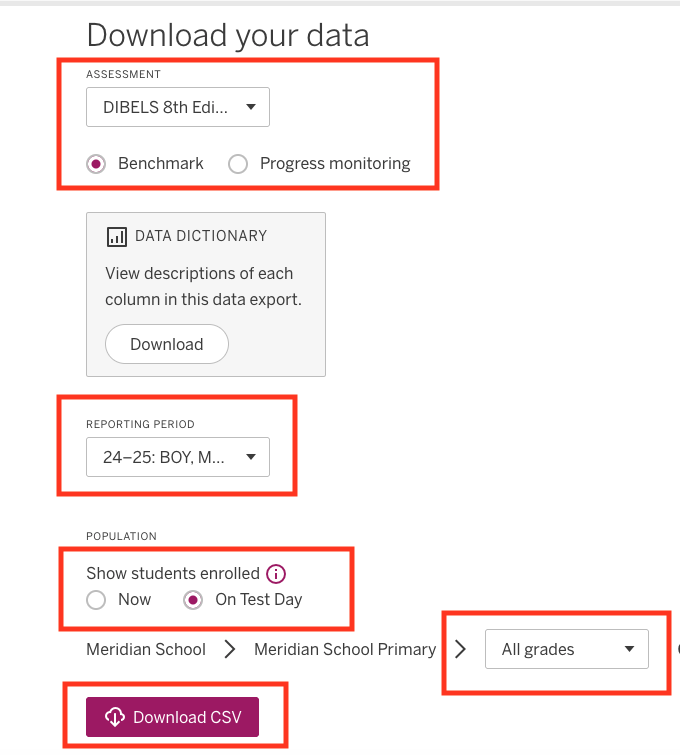
Choose the correct Assessment.
Choose the correct year and testing window(s); i.e. Reporting Period.
Choose Students.
Choose Grade Levels needed.
Download as a CSV file.
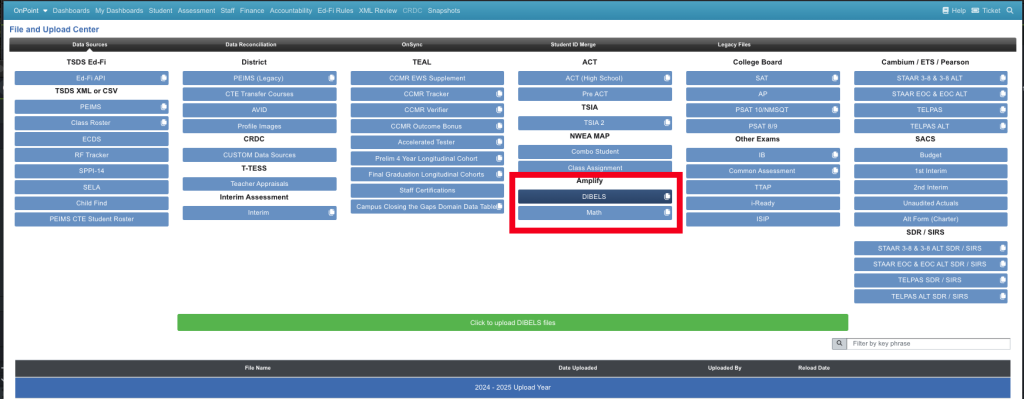
Go to the File Center > Data Sources > Amplify > Dibels to upload your Dibels 8th Ed. Diagnostic Assessment
Go to the File Center > Data Sources > Amplify > Math to upload your Math Diagnostic Assessment
Amplify onsync
If your district uses Amplify DIBELS or Lectura, these files can now be retrieved automatically through OnSync. To get started:
- Contact your Amplify Customer Success Manager to obtain the required connection information.
- Submit an OnDataSuite support ticket.
- We’ll complete the OnSync configuration for your district.
Once configured, your files can be retrieved automatically—no manual uploads required.