
Where to Find This Report
Student Profile > Student Information> CCMR View
What this report shows
The CCMR Student Profile view provides a comprehensive, student-level breakdown of College, Career, and Military Readiness indicators aligned to Texas accountability.
This view includes:
- Overall readiness status (College, Career, Military)
- CCMR indicator tiles (Y/N status)
- Detailed breakdowns of each qualifying pathway, including:
- Dual Credit
- AP/IB
- OnRamps
- Industry-Based Certifications (IBC)
- CTE Pathway Progress
- Associate Degree indicator
- Special Education graduation pathways (when applicable)
Suggested Uses
- Monitor individual student CCMR progress
- Identify which indicators are met vs. still needed
- Support counseling conversations and graduation planning
- Track CTE pathway completion and certification progress
- Verify data accuracy before PEIMS submission
- Provide real-time interventions for students not yet CCMR-ready
Data Sources
This view pulls from multiple integrated data sources:
- PEIMS submissions
- Course completion records
- Assessment data (TSIA2, SAT, ACT, AP/IB)
- Industry certification files (IBC)
- CTE course sequencing and program of study
- OnRamps and Dual Credit records
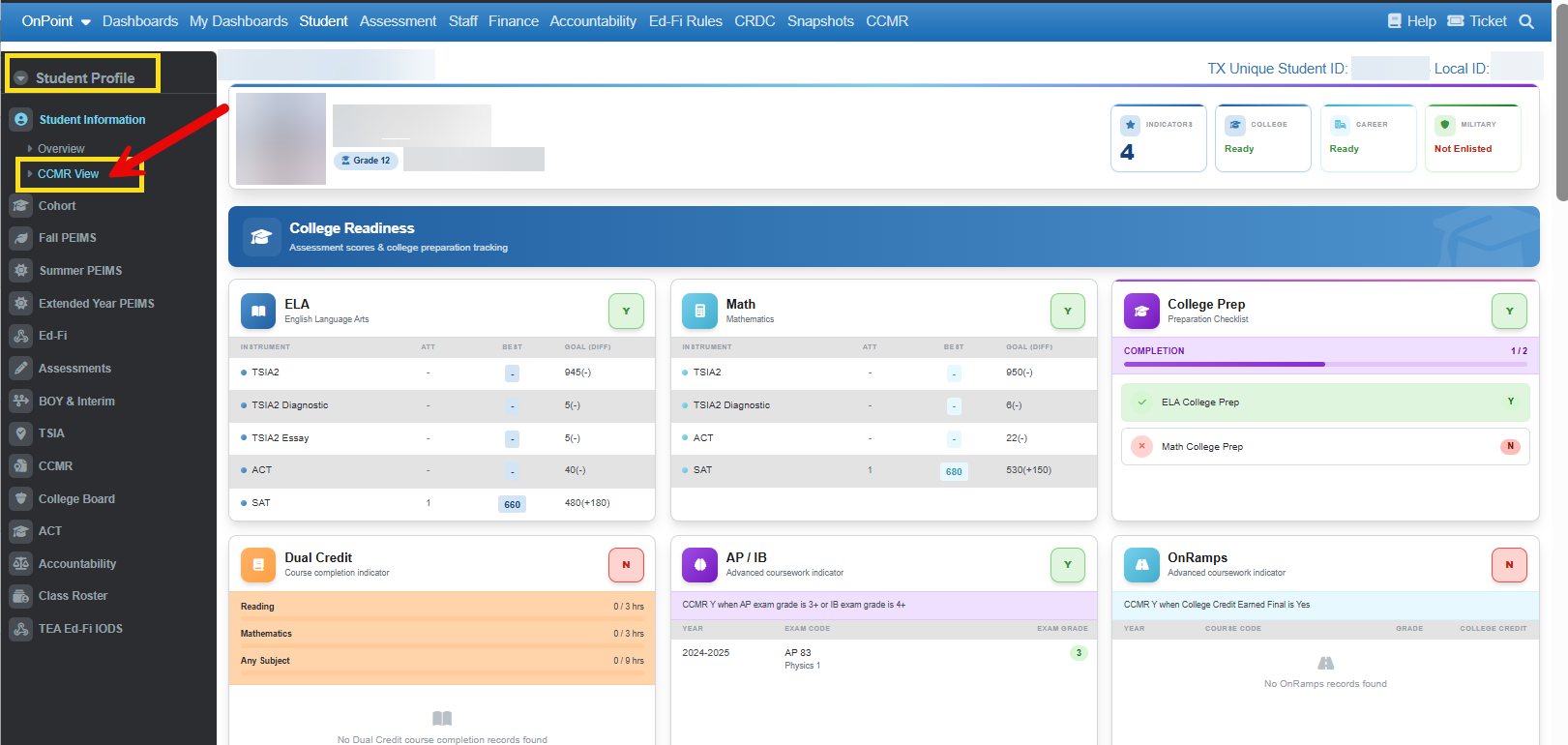
Visuals and Data Views
🔹 Readiness Summary Tiles
At the top of the profile, users see quick indicators for:
- College Readiness (Y/N)
- Career Readiness (Y/N)
- Military Readiness (if applicable)
- Total CCMR indicators earned
🔹 College Readiness Section
Breaks down qualifying assessment benchmarks:
- ELA and Math readiness
- TSIA2 scores
- SAT/ACT performance
- Diagnostic and essay components
Clear comparison of:
- Best score
- Goal threshold
- Attempts
🔹 CTE Student Pathway Status
Displays:
- Program of Study
- Status levels:
- Participant
- Concentrator
- Completer
- Includes a course sequence table showing:
- Year
- Course name
- Level
- Credits earned
🔹 Industry Certification Progress
Tracks:
- Certification attempts
- Certifications earned
- IBC status (Not Started, In Progress, Completed)
🔹 Dual Credit Detail
Shows:
- Course completion status
- Credit hours by subject area:
- Reading
- Math
- Other
- Individual course history with pass status
🔹 Advanced Coursework (AP/IB & OnRamps)
Displays:
- Exam/course records (if available)
- Qualification rules for CCMR
- Status when no records are found
🔹 Additional Indicators
Includes:
- Associate Degree Indicator
- IEP/Advanced Grad Plan indicators (SPED-specific CCMR rules)
- Level I/II Certificates (THECB)
How to Interpret This Report
- “Y” (Yes) = Student meets CCMR criteria for that indicator
- “N” (No) = Indicator not yet met or missing data
Key interpretation tips:
- A student only needs one CCMR indicator to count for accountability, but this view shows all possible pathways
- Dual Credit and CTE pathways often require multiple components—progress bars help visualize completion
- Assessment-based indicators (TSIA2, SAT, ACT) show how close a student is to meeting thresholds
- Missing records (e.g., AP/IB, OnRamps) may indicate:
- No participation
- Or missing data files
Related Articles & Helpful Reports
- CCMR Dashboard (District/Campus Level)
- CTE Program of Study Reports
- Industry-Based Certification Tracking
- TSIA2 Readiness Reports
- Graduation Plan & Endorsement Tracking
- PEIMS Verification Reports for CCMR Indicators