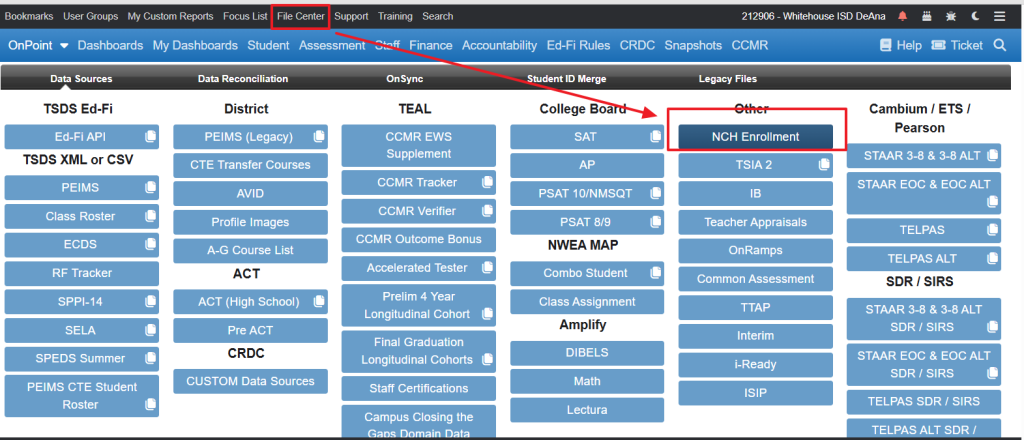
File Type: CSV
National Clearinghouse Data Website
Step 1: Obtain the NSC Enrollment File
- Log in to the NSC secure portal
- Request or download the Enrollment Detail Report
- Save the file locally (do not open and re-save unless formatting is required)
Best Practice: Keep the original file untouched and make a copy if edits are needed.
Step 2: Review File Formatting
Before uploading, open the file in Excel or a text editor and confirm:
- The header row is present
- No extra blank rows at the top
- Student identifiers are consistent with ODS records
- Date fields are not corrupted or auto-formatted
| A | Your_Unique_Identifier |
| B | First_Name |
| C | Middle_Name |
| D | Last_Name |
| E | Name_Suffix |
| F | Requester_Return_Field |
| G | Record_Found_Y/N |
| H | High_School_Code |
| I | High_School_Grad_Date |
| J | College_Code/Branch |
| K | College_Name |
| L | College_State |
| M | 2-Year/4-Year |
| N | Public/Private |
| O | Enrollment_Begin |
| P | Enrollment_End |
| Q | Enrollment_Status |
| R | Graduated |
| S | Graduation_Date |
| T | Degree_Title |
| U | Major |
| V | College_Sequence |
| W | Program_Code |
Step 3: Load the File into OnDataSuite
- Navigate to File Center
- Select National Student Clearinghouse – Enrollment
- Click Upload File
- Choose your NSC Enrollment file