
The Student Profile in OnDataSuite provides a comprehensive, single-student view that combines enrollment, demographics, program participation, and assessment results. The Assessment tab focuses specifically on a student’s state and local testing history, providing teachers, counselors, and administrators with an easy way to review a student’s academic performance over time.
The Student profile can be accessed from any aggregate list of students by clicking on the blue numbers under SID or the View Profile under SID
The Student can also be searched in the black search bar menu by student ID, First Name, and Last Name to get to an aggregate list of that student.
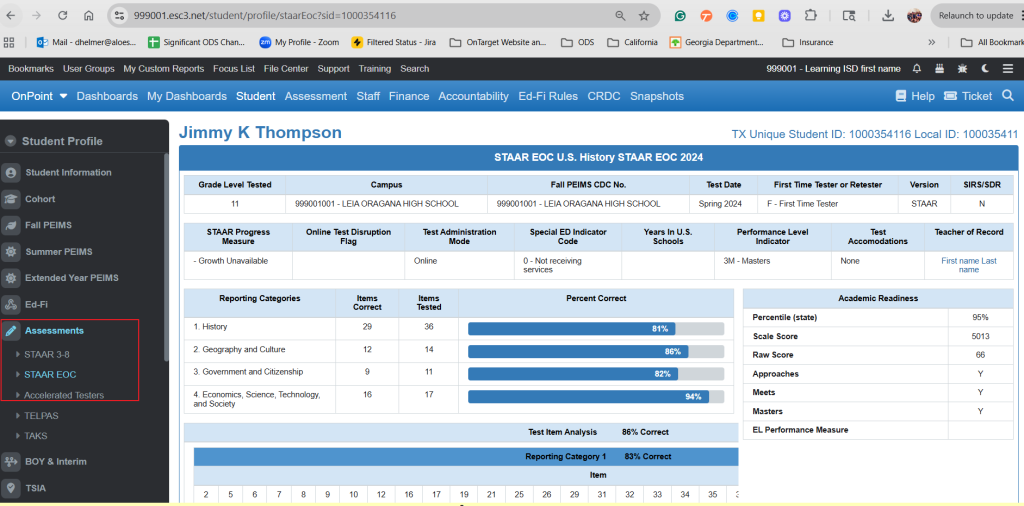
Features of the Assessment Tab
1. State Assessments (STAAR & EOC)
- Displays historical STAAR and EOC results across tested subjects and grade levels.
- Shows Performance Level (Did Not Meet, Approaches, Meets, Masters).
- Includes Scale Scores, Raw Scores, and Percent Correct where available.
- Highlights Growth Measure
- Lets you know if they are an accelerated tester
- Individual Responses by reporting category
Why Use the Assessment Tab?
The Assessment tab in Student Profile helps educators:
- Quickly see a student’s testing history in one place.
- Identify strengths and areas of concern across subjects.
- Support intervention planning, parent communication, and CCMR tracking.
- Eliminate the need to search multiple TEA or local systems for past results.