Report Location
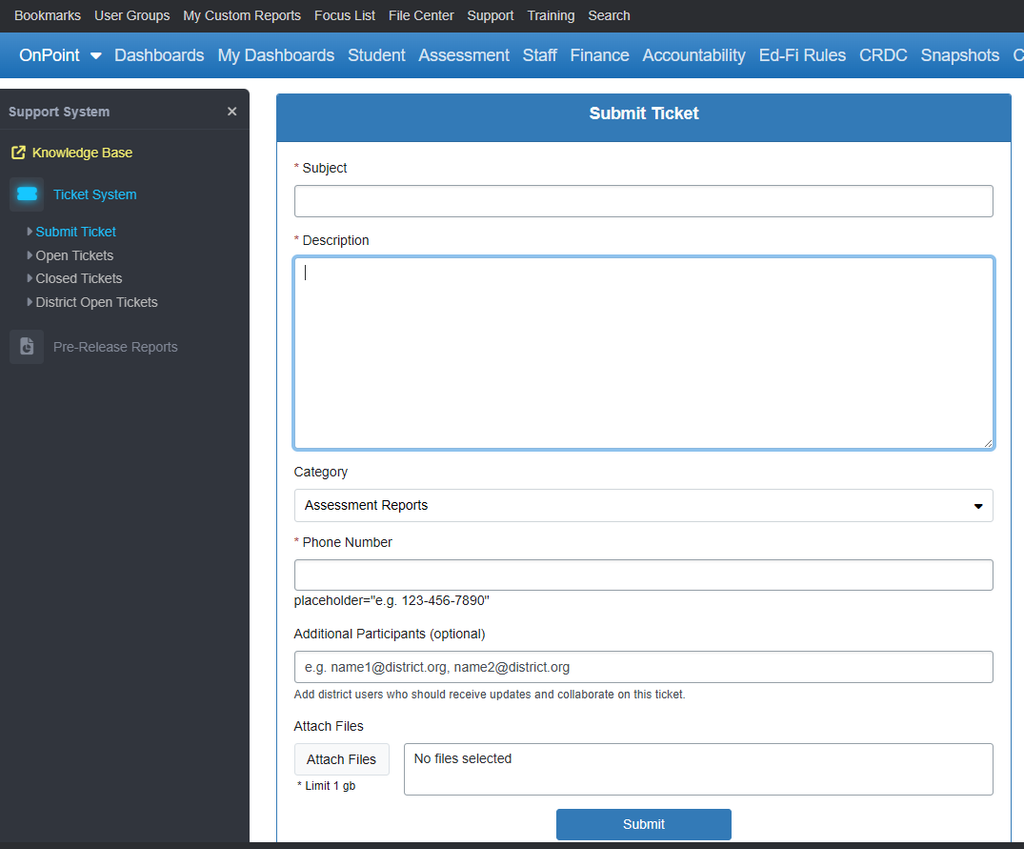
To access the OnDataSuite Internal Ticket System, click on the ticket icon on the right side of the blue banner.

Summary
From time to time, users may have a question that is not answered in the knowledge base or encounter an issue with the system. When this happens, submit a ticket for additional support.
Usage
Users are encouraged to create and submit a ticket through the OnDataSuite internal ticket system to resolve inquiries or technical issues.
Special Notes
- Step 1: Click the ‘Ticket’ icon in the upper right hand corner of the blue banner while logged into your account.
- Step 2: Type in the Subject.
- Note: As you begin to type you will notice KB Articles begin to populate on the right hand side of the ticketing system. You may use these articles to problem-solve as appropriate.
- Step 3: Describe the issue in the “Description” box in as much detail as possible.
- Step 4: Select an issue Category
- Step 5: Include a good call back number
- Step 6: Add additional participants as appropriate
- Step 7: Attach files if applicable. Screenshots are also helpful.
Note: If possible capture the entire screen - Step 8: Click Submit