
Partnership Overview
TASBO and OnDataSuite have partnered to provide districts with enhanced support for analyzing staff and finance data, developing reports, tools, and templates, and helping leaders make informed decisions.
This partnership gives districts the option to grant limited access to TASBO staff to their OnDataSuite database.
See Adding/Removing TASBO Access to your OnDataSuite Database for instructions on how to establish this partnership.
District Controls Access
- Access is entirely controlled by your district.
- District administrators manage TASBO user credentials. Note: Your account must have “Administrator Rights” to maintain access.
Key Point: LEA’s decide if, when, and how TASBO staff can access your data.
Security & Confidentiality
- TASBO agrees to strict data confidentiality as outlined in the MOU.
- TASBO complies with FERPA and all applicable privacy laws.
- Access is strictly for staff and finance reporting support.
- OnDataSuite provides the technical platform only; the district maintains control.
Default Access
A conservative, recommended default permission set is applied automatically after enabling TASBO.
Upon selecting the agreement to the TASBO partnership, a new user will be created with default permissions detailed below. At any time, the district can choose to modify those permissions by selecting the EDIT button.

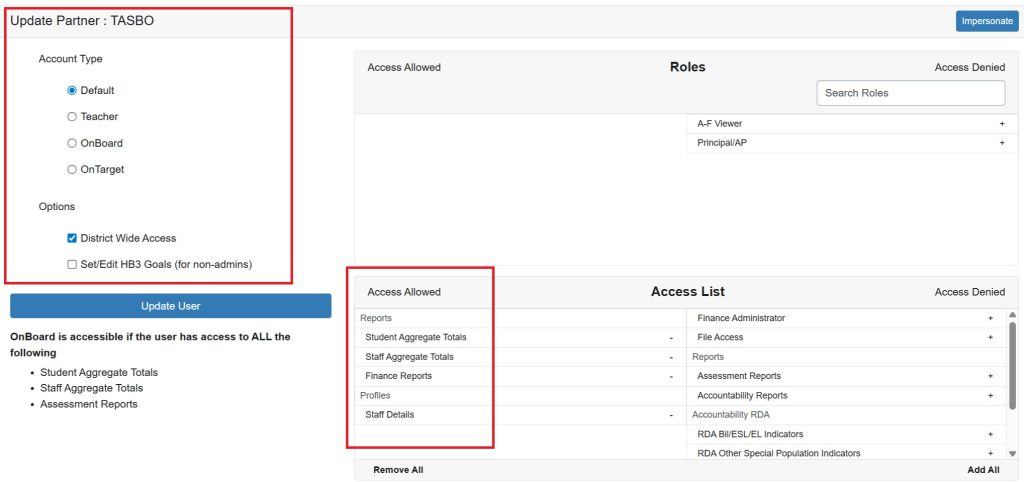
TASBO can access by default:
- Student Aggregate Totals
- Access to Dashboard counts and student reports. Tasbo users will not be allowed to drill down to individual student level profiles.
- Staff Aggregate Totals & Profiles
- Access to all staff reports and staff profiles. Tasbo access will not include staff social security information.
- Finance
- Access to all finance reports. Attendance calculations will be available but Tasbo access will not allow a drill down individual student level profiles.
This message will be displayed if the TASBO User drills down to student information.

TASBO cannot access by default:
- Accountability reports
- Assessment reports
More information about user account permissions can be found here.
Adding a new User
For more information about TASBO please visit https://www.tasbo.org/