STAAR 3-8 & STAAR 3-8 ALT- Accepted Data File Layout
(TEA Link to data file format)
This file is typically a text file (.TXT)
Historical files may be a data file (.DAT)
Other File Information
When naming files, only use letters, numbers, dashes or underscores.
File cannot be compressed or zipped.
File name cannot contain spaces.
Loading State Assessment Files – Step-by-Step
For step-by-step details on how to load assessment files please visit the KB article below
Loading State Assessment files
Do not attempt to load any summative data file. These files are NOT formatted as student prelim or final files and will not load into the OnDataSuite file center. These files will be named similar to the example below.
Example: YOURISD_Page1_ALB-ZAC_StudentData_099000 AM.csv
Assessment File Upload Process – Please read before uploading any data files!
OnDataSuite has updated our system file importer to accept the data file that adheres to the latest TEA released data file format. Before uploading any file, districts are HIGHLY encouraged to verify that the file they are attempting to upload has been formatted in accordance with the related assessment data file format specifications published here: https://tea.texas.gov/student-assessment/testing/student-assessment-overview/data-file-formats
File Naming Convention
2025–2026 Naming Conventions for Reports and Files
Please review the TEA posted naming conventions for your uploaded data files into your OnDataSuite file center.
Note that the only files that should be loaded into the file center are the files titled SP or SF as outlined in the posted 2025–2026 Naming Conventions for Reports and File
https://tea.texas.gov/student-assessment/student-assessment-results/2025-2026-file-naming-convention.pdf
| Assessment File | Cambium Naming Convention | OnDataSuite File Center Load Location |
| STAAR 3-8 Preliminary Administration Report | SP_SeasonYY_3-8_DistrictCode_DistrictName_V##.zip | STAAR 3-8 & 3-8 ALT |
| STAAR 3-8 Final Accountability Report | SF_SeasonYY_3-8_DistrictCode_DistrictName_V##.zip | STAAR 3-8 & 3-8 ALT |
| STAAR 3-8 ALT 2 Preliminary Administration Report | SP_SeasonYY_3-8ALT_DistrictCode_DistrictName_V##.zip | STAAR 3-8 & 3-8 ALT |
| STAAR 3-8 ALT 2 Final Accountability Report | SF_SeasonYY_3-8ALT_DistrictCode_DistrictName_V##.zip | STAAR 3-8 & 3-8 ALT |
Assessment File Management
OnDataSuite populates system-wide reports using your uploaded assessment data. While districts may upload Student Preliminary (SP) files for early review, please note that these results are considered unofficial and may contain missing or inaccurate data.
Once Student Final (SF) files are released, we highly recommend deleting all SP files and replacing them with SF files. This ensures that your end-of-year accountability projections are calculated using the most accurate data available.
Where to get your file
Cambium will be placing the state agreed upon data file formatted test results directly into the District Test Coordinator’s Cambium inbox using the naming conventions outlined in the table above.
Please consult with the Texas Student Assessment Program Calendar of Events to determine the date the file will be released in your TIDE folder here
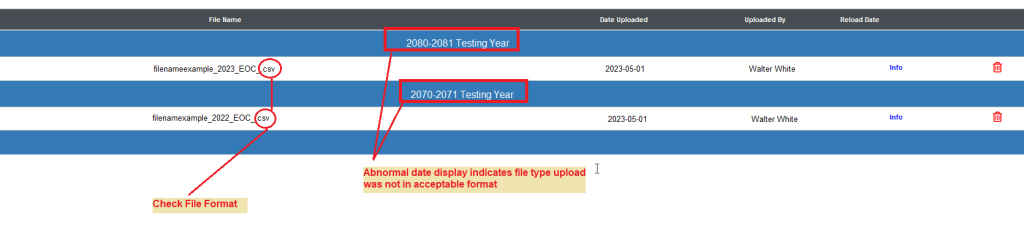
How to tell if the file you loaded was not formatted properly
If you load a file and and it is filed under an abnormal year, this is a strong indicator that the file loaded was either the incorrect file from what was specified above, or was not formatted as expressed in the directions above. If this happens, you will need to use the trash can icon to delete the file from your file center and then reupload the correctly formatted file.